The Circuitry
THE CIRCUITRYYour one-stop source for all tech news
HOMETODAYNEWSFEEDEVENTS
BOOKMARKS
RSS
© 2026 The Circuitry
About UsSourcesContactCorrectionsPrivacy
  • Today
  • Feed
  • Events
  • Saved
Scroll for more
Verification
VERIFIEDConfidence: HIGH
Source identified
Claims cross-referenced
No discrepancies found
Sourcing
1source

via PC Gamer

PC Gamer · track record
17Stories
100%Verified
330d
All sources →
Markets
MSFT···

Live quote · not investment advice

Home/Tech/Microsoft Lets Windows 11 Taskbar Sit on Any Edge
VERIFIEDBy Xavier Rivera· ·1.5 min read

Microsoft Lets Windows 11 Taskbar Sit on Any Edge

Microsoft announced it will let Windows 11 users position the taskbar on any screen edge while adding toggles and quality improvements to the Start menu. The updates restore capabilities removed at Windows 11 launch and focus on making the OS more personal.
Source:PC Gamer
Post
Microsoft Lets Windows 11 Taskbar Sit on Any Edge
TL;DRAI · 60 sec read

Microsoft allows the Windows 11 taskbar to move to any screen edge with alignment, width, and vertical label options plus Start menu section toggles. This restores customization removed at launch and begins testing with Insiders in the experimental channel over the coming weeks.

Microsoft continues to focus on core Windows improvements instead of adding further AI features. The latest step appears in a blog post that expands customization options for the taskbar and Start menu in Windows 11.

Taskbar changes

The company announced that users will soon position the taskbar on any of the four screen edges. Alignment choices for the Start button and icons will match each placement, offering top-aligned or centered layouts on vertical sides and left-aligned or centered layouts on horizontal sides. These capabilities existed in earlier Windows releases before being dropped in Windows 11.

Vertical taskbars can appear as a narrow strip matching the current bottom default, a wider version that displays full application labels, or an ultra-thin variant suited to low-resolution screens where screen space is limited.

Start menu updates
From The CircuitryThe Feed — live briefs across tech, all day.See what’s happening →

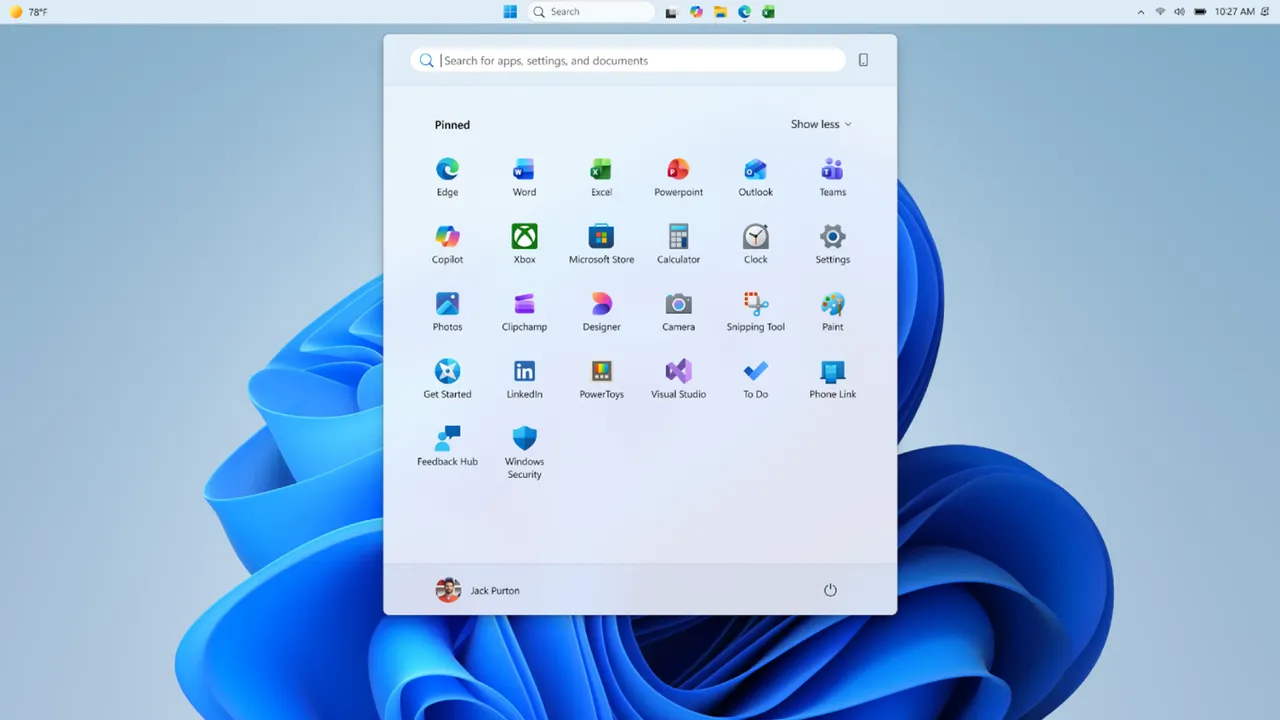
New section-level toggles will let users independently show or hide the Pinned, Recommended and All areas. Additional controls will adjust overall menu size and allow the account name and profile picture to be hidden for privacy reasons.

Microsoft is also revising the Recommended area, renaming it Recent "to better reflect what the section primarily shows, including recently installed apps and recently used files." The company reported that it is refining the selection and ordering of files shown there "to reduce less relevant items and better reflect what you have been working on."

The features will reach Windows Insiders in the Experimental channel during the coming weeks. No firm timeline has been shared for broad availability, though the updates are expected to arrive for general users within a few months.
The refinements follow Microsoft's stated goal of restoring long-requested personalisation options that many users missed after the Windows 11 launch.

EXPERT TAKE

Enterprise admins overseeing Windows 11 deployments will find these personalization controls useful for reducing user friction around interface preferences without custom scripting.

Why this mattersAI · ~100 words

Tap a lens to see what this story means for you.

Reader-supported
DonateBuy me a coffee →Follow@thecircuitry_ →Follow@thecircuitry.to →

Reader-supported · Daily Brief

Daily brief at 7 AM ET. Top tech stories, every morning. Sourced and fact-checked.

HELP US IMPROVE
From The Circuitry

See what’s happening right now

The Feed runs all day — short, verified briefs the moment they break.

Open the Feed →
From The Circuitry

Follow @thecircuitry_

Every story we publish, as it happens. No noise between.

Follow on X ↗On Bluesky ↗

Reader-supported

The Circuitry is a passion project I've always wanted to build, and I love the work behind it.

Running it costs real money. APIs, hosting, time. To keep improving the site and growing this into something useful for everyone, those costs have to be covered.

Any contribution is appreciated. If not, no pressure. Thanks for reading.

Buy me a coffee
Windows 11TaskbarStart MenuMicrosoft
More fromPC Gamer
  • Microsoft accelerates Quantum Safe Program to 2029

    Tech · 3d
  • Valve prices Steam Machine from a reported $1,049, launches randomized sign-ups

    Gaming · 17d
  • PlayerUnknown Productions ends Prologue: Go Wayback! development as it leaves early access

    Gaming · 21d
More inTech
  • Toyota postpones 2027 Highlander BEV output

    Tech · 3h
  • OpenAI Debuts GPT-5.6 Models and ChatGPT Work Agent

    Tech · 3h
  • Microsoft to expand Patch Tuesday security releases with AI

    Tech · 4h
SupportThe Work

The Circuitry is reader-supported. If you find the daily brief useful, you can buy me a coffee to keep it going.

Buy a coffee →
SubscribeCircuitry Brief

Daily brief at 7 AM ET. Top tech stories, every morning.

MORE IN TECH

Toyota postpones 2027 Highlander BEV output

Toyota is pushing back output of its initial three-row battery-electric SUV, the 2027 Highlander BEV, and will keep the existing gasoline and hybrid Highlander models on sale longer while three new electric SUVs gain U.S. traction.

OpenAI Debuts GPT-5.6 Models and ChatGPT Work Agent

OpenAI has now made its GPT-5.6 family of models public at the same time it introduced the ChatGPT Work agent, arriving two days after Anthropic expanded its competing Claude Cowork service. The overlapping launches highlight an intensifying race between the companies to equip non-technical staff with automated document tools.

Microsoft to expand Patch Tuesday security releases with AI

Microsoft is expanding the number of fixes delivered in each Patch Tuesday release for Windows 11 by using AI to surface potential security issues earlier. The adjustment comes amid rising AI-assisted vulnerability hunting and exploitation by both attackers and security researchers.